ApexSense
A real-time iRacing overlay suite built with Electron. Features live tire telemetry with physics-based temperature estimation, a proximity radar, a live standings board, and an AI-assisted setup coach — all as transparent overlays on top of the game. No clutter, just the data you need to go faster.
Free · Windows 10/11 · Requires an active iRacing session
Screenshots
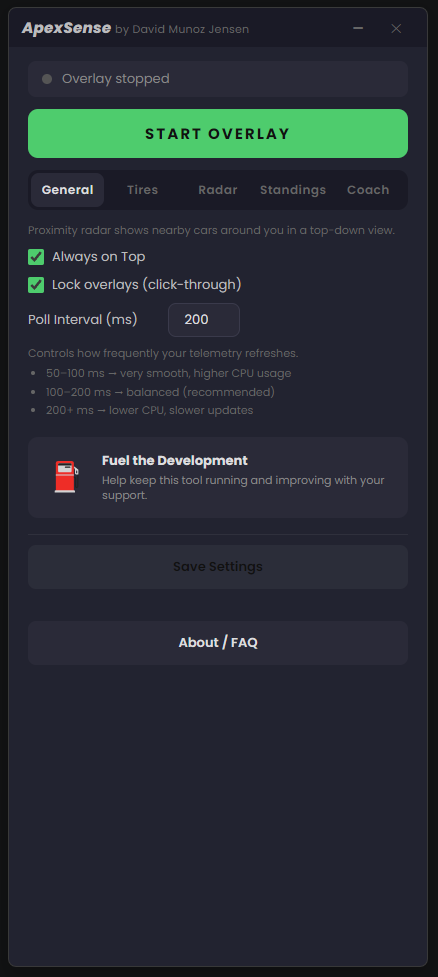
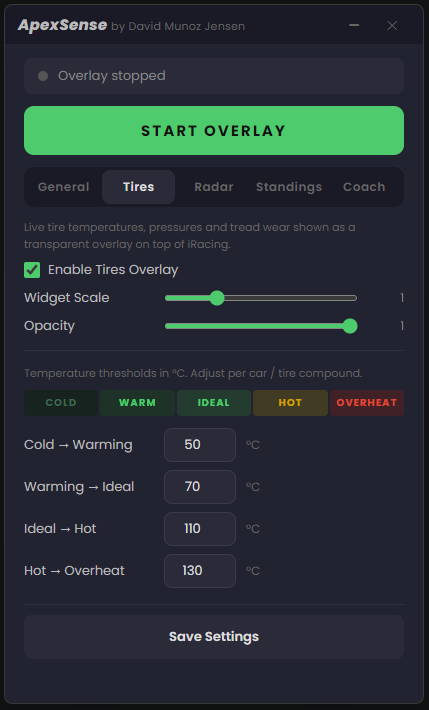
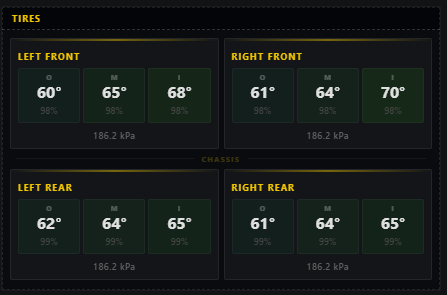
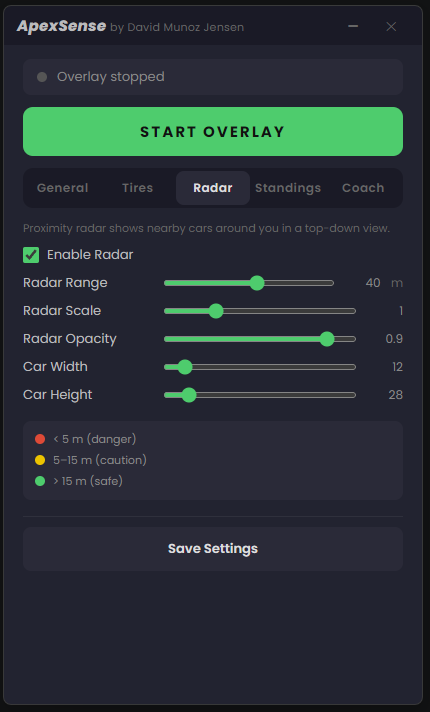
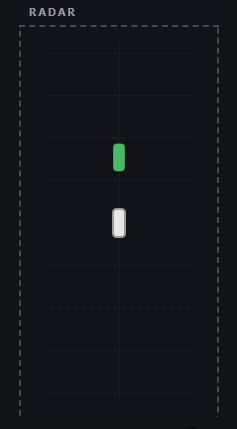
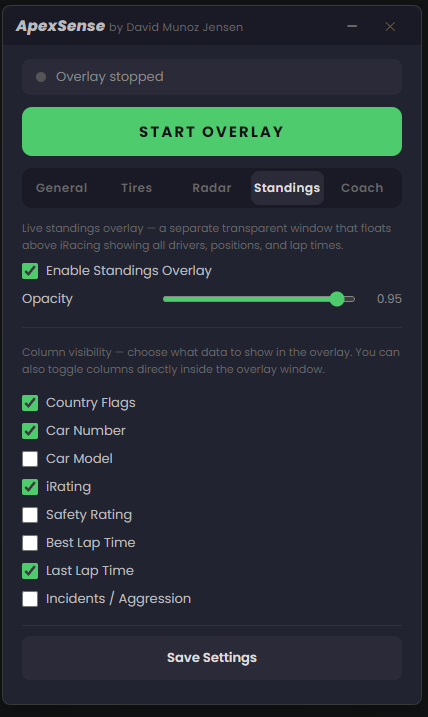
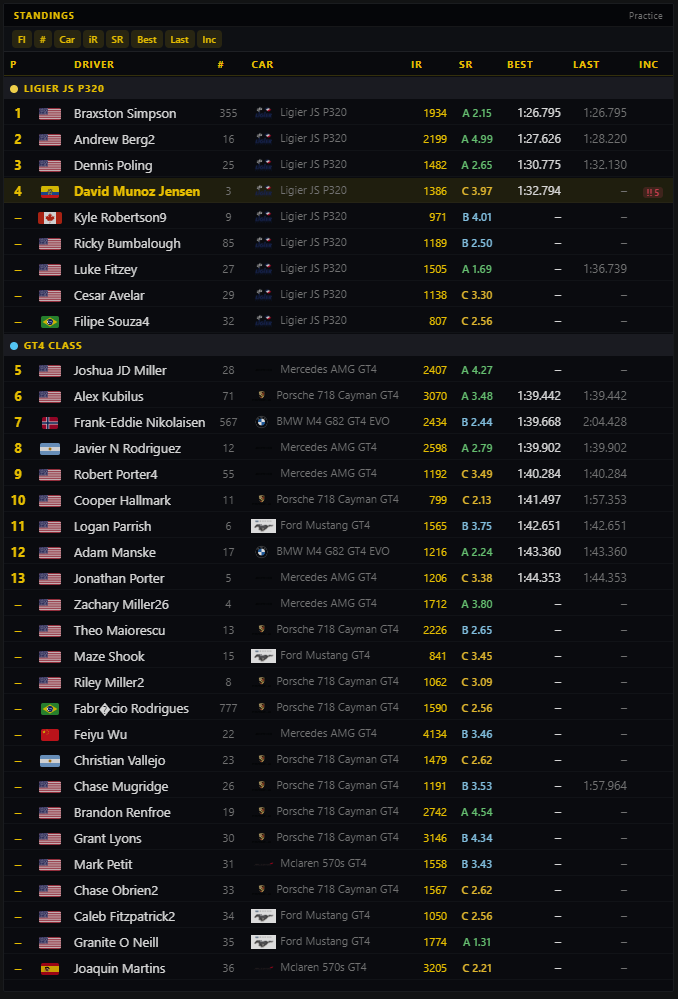
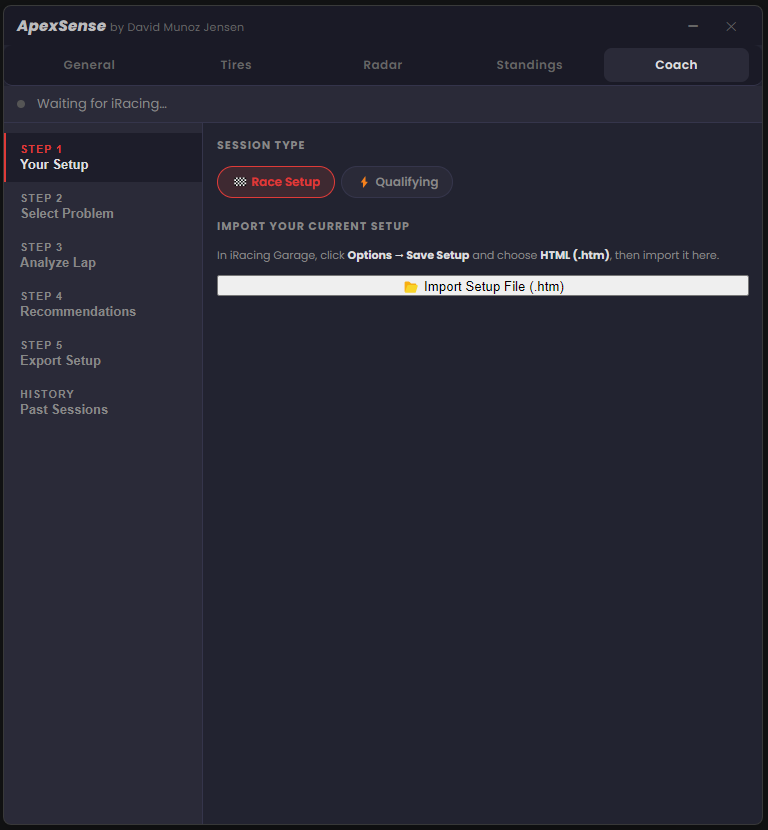
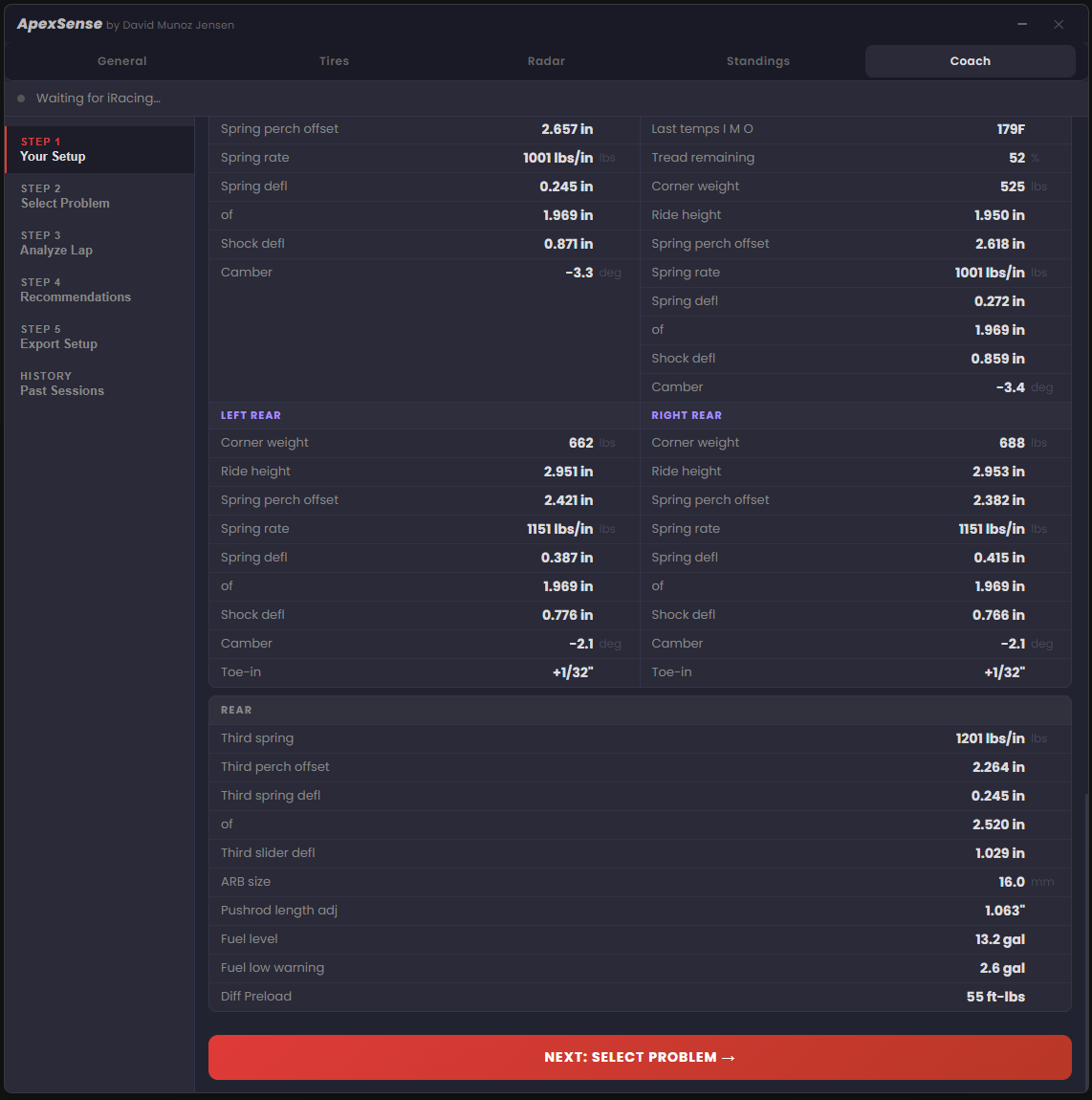
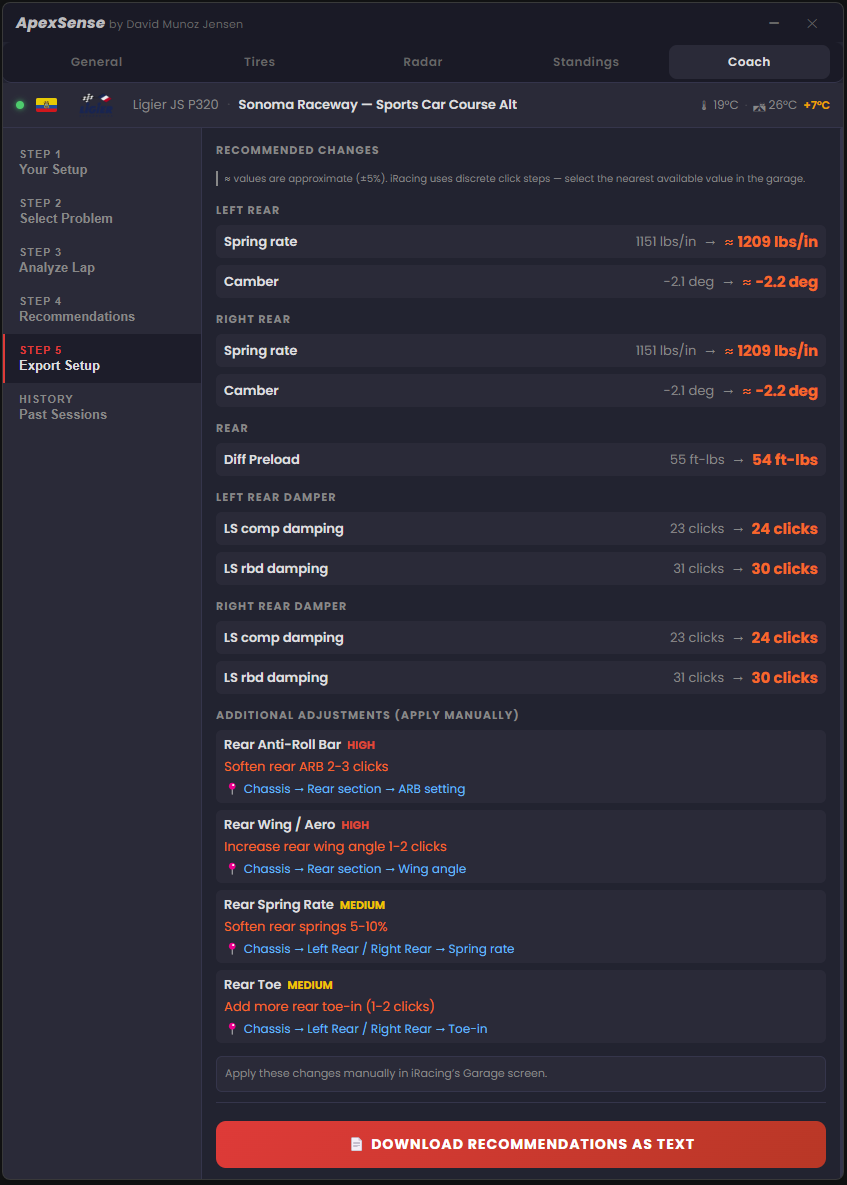
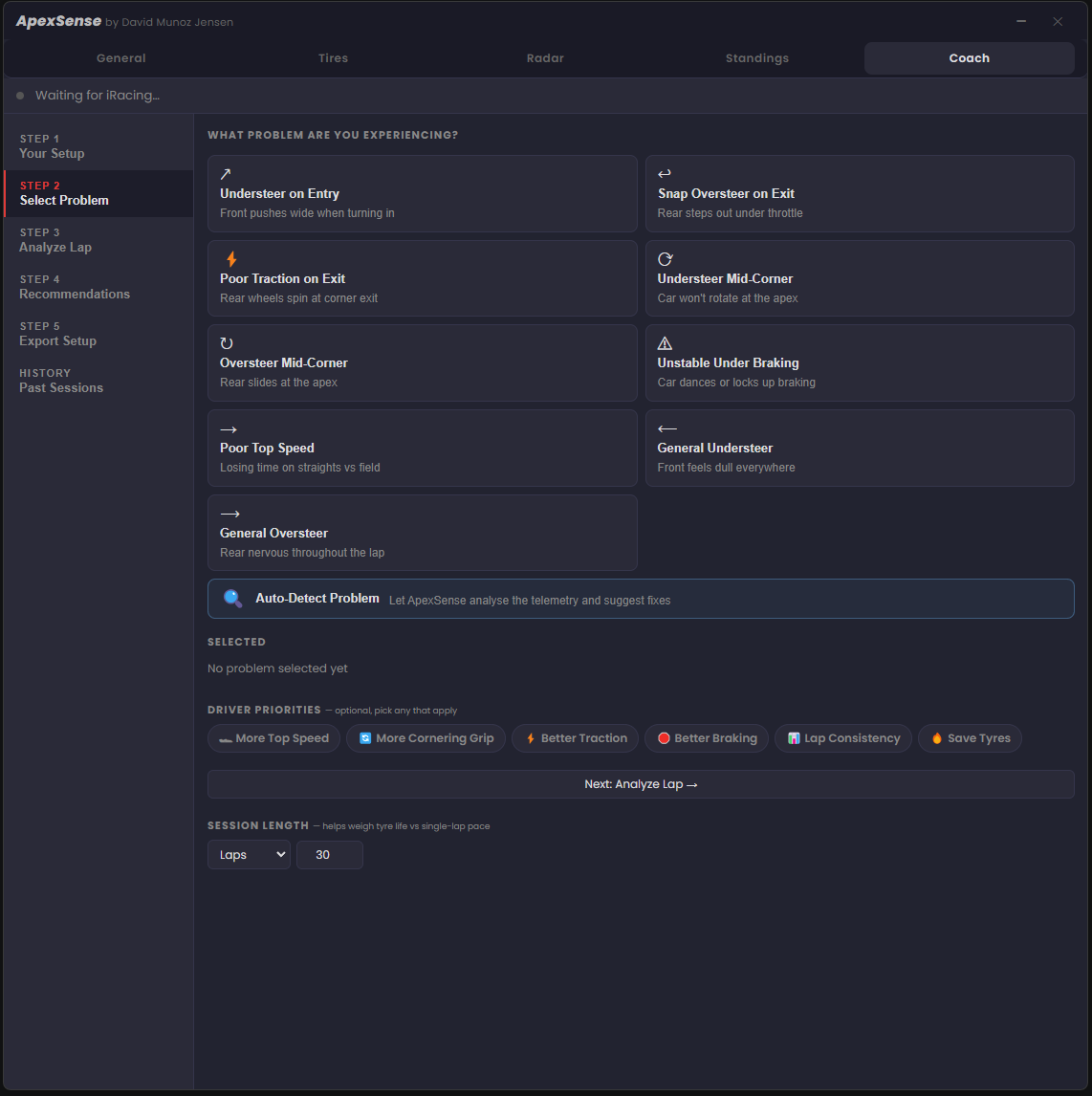
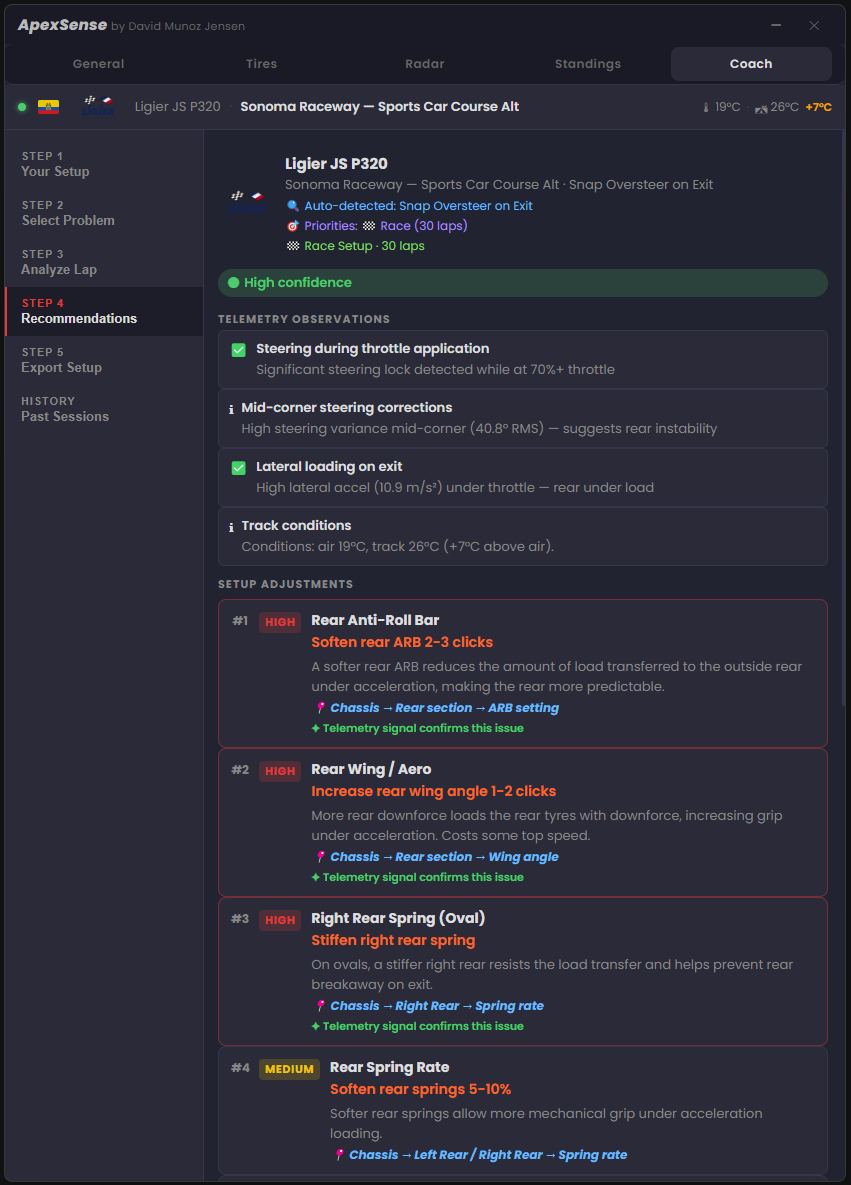
See ApexSense in action: launcher settings, tire overlay, proximity radar, standings board and setup coach
Email Support
Questions about installation, telemetry accuracy, or anything else? Reach out directly.
Bug Reports
Noticed wrong tire temps, radar glitches, or a crash? Help improve ApexSense by reporting bugs.
Feature Requests
Want delta timing, fuel strategy, or a new widget? Share your ideas and help shape the roadmap.
About ApexSense
ApexSense is a standalone Electron app that runs alongside iRacing and reads telemetry data directly from the iRacing SDK. It launches five frameless windows: a settings launcher, a tire overlay, a proximity radar, a live standings board, and an AI-assisted setup coach — all designed to sit transparently over the game without any performance impact.
Five Windows
- Launcher: Settings panel, start/stop overlays, configure all options (420 × 960 px)
- Tire Overlay: Live tire temps, wear & pressure HUD (440 × 310 px, scalable)
- Radar Overlay: Top-down proximity canvas (200 × 420 px, scalable)
- Standings Board: Floating live standings with driver data and column toggles (900 × 500 px, resizable)
- Setup Coach: 5-step guided workflow — import setup, analyse lap, get recommendations, export
Key Features
- Real-time tire temperature, wear % and pressure for all four tires
- Physics-based thermal estimation while on track (iRacing SDK only updates temps in pits)
- Drivetrain-aware heat model: RWD, FWD, AWD, RWD Hybrid
- Weather-aware cooling: wind speed, humidity, air temp and track temp
- Fully customisable temperature thresholds per car/compound
- Proximity radar with colour-coded danger zones: red (<5 m), yellow (5–15 m), green (>15 m)
- Live standings overlay — flags, iRating, lap times, incidents, multi-class grouping
- AI-assisted Setup Coach — telemetry-based setup recommendations in 5 steps
- Export modified
.htmsetup files ready to load directly in iRacing - Always-on-top, click-through transparent overlays — positions saved across sessions
- Adjustable poll interval (50–200+ ms) and scalable overlay sizes
Tire Temperature Colours
- ■ Dark teal: too cold, no grip
- ■ Forest green: optimal operating zone
- ■ Amber: caution, getting hot
- ■ Crimson: overheating, degradation risk
Supported Drivetrains
- RWD: GT3, GT4, GTE, LMP2, Formula, MX-5, GR86, ovals (default fallback)
- FWD: Hyundai Elantra N TCR, Honda Civic Type R TCR, Audi RS3 LMS
- AWD: Audi 90 GTO, Ford Fiesta Rallycross, VW Beetle Rallycross
- RWD Hybrid: Cadillac GTP, BMW M Hybrid V8, Acura ARX-06, Mercedes W13
Standings Board Columns
- Pos — Position with animated ▲▼ change indicators
- Flag — Country flag from iRacing driver info
- Car # / Make — Car number and model with manufacturer logo
- iR / SR — iRating and colour-coded Safety Rating
- Best / Last — Best and last lap times
- Inc — Incident count with colour-coded severity badge
- Multi-class grouping with class colour dots
- Scrollable even when overlays are locked (click-through)
System Requirements
- Windows 10 or Windows 11 (64-bit)
- iRacing installed and running
- iRacing SDK memory-mapped file enabled (automatic when session is active)
- No administrator rights required
- ~120 MB disk space
AI-Assisted Setup Coach
The Setup Coach analyses your real lap telemetry and generates targeted car setup recommendations. Import your current iRacing setup, drive a lap, and get ranked adjustments with the telemetry evidence that backs each change — so you understand why it helps.
5-Step Workflow
- Import Setup — Load your current iRacing
.htmsetup file - Select Problem — Choose a handling issue or let Coach auto-detect from telemetry
- Analyse Lap — Drive a lap while ApexSense records telemetry in real time
- Recommendations — Review ranked adjustments backed by telemetry evidence
- Export Setup — Download the modified
.htmfile ready to load directly in iRacing
Telemetry Analysis
The engine records throttle, brake, steering angle, speed, lateral acceleration, gear, RPM and tyre temperatures every poll cycle. It scores setup adjustments against detected signals and returns a confidence level (low / medium / high) with human-readable telemetry observations.
Detectable Handling Problems
- Understeer on corner entry
- Snap oversteer on exit
- Poor traction out of slow corners
- Understeer mid-corner
- Oversteer mid-corner
- Unstable under braking
- Lacking top-end speed
- General understeer / oversteer
- Auto-Detect — Coach picks the problem from your telemetry
Supported Car Categories
- Formula: F3, F4, IndyCar, IR-18, Pro Mazda
- GT: GT3, GT4, GTE
- Prototype: LMP2, GTP / LMDh
- Stock Car: NASCAR, ARCA
- Touring: TCR
- Sportsman: Skip Barber, MX-5, Street Stock
Frequently Asked Questions
Download the ZIP file using the button on this page. Extract it anywhere on your PC (e.g., C:\ApexSense\), then run ApexSense.exe. No installer required, it's a portable application. Have iRacing open and in an active session for the overlays to connect to telemetry data.
The iRacing SDK only updates tire temperature channels when the car is in the pits. Once you leave the pit lane those values freeze. ApexSense detects this stale data and activates a physics-based thermal estimation model. Estimated values show a ~ prefix (e.g., ~95°) and "EST" appears after the tire label. When you return to the pits, all values snap back to real SDK readings.
The model accounts for speed-based rolling friction, brake heat (front-biased or rear-biased depending on drivetrain), throttle/traction heat, lateral cornering forces with per-zone distribution, and weather-aware cooling using real track temp, air temp, wind speed and humidity. Tires heat up with a 30 s time constant and cool with 45 s, matching real rubber thermal behaviour. Expect temperatures to be within a reasonable range for hot/cold awareness; treat them as a guide, not a precision measurement.
Yes. ApexSense reads standard iRacing SDK channels that are available for every car. The drivetrain detection looks up the car's screen name once per session and selects the appropriate heat model (RWD, FWD, AWD, RWD Hybrid). Any car not found in the lookup table defaults to the RWD model, which is a safe fallback for the vast majority of iRacing content.
The radar overlay draws a top-down canvas showing your car in the centre and nearby cars around you. Distance is represented in metres and colour-coded: red for cars within 5 m (danger), yellow for 5–15 m (caution), and green for cars beyond 15 m (safe). You can adjust the radar range, scale, opacity, and car rectangle dimensions in the Radar settings tab.
Yes. When "Lock overlays (click-through)" is unchecked in the General settings, the overlays become draggable and you can move them anywhere on your monitor. Once positioned, re-enable the lock to make them fully click-through so they don't interfere with your mouse control in iRacing. Positions are saved between sessions.
The poll interval controls how frequently the app reads telemetry from iRacing (in milliseconds). Lower values give smoother, more responsive updates but use slightly more CPU: 50–100 ms for very smooth updates, 100–200 ms for a balanced approach (recommended), and 200+ ms for lower CPU usage with slower refresh. The app defaults to 100 ms.
Open the Tires tab in the launcher. You'll see four threshold inputs: Cold to Warming, Warming to Ideal, Ideal to Hot and Hot to Overheat. These control the colour zones displayed on the tire overlay. Defaults are 50 / 70 / 110 / 130 °C, a good starting point for most GT-class cars. For cold-weather compounds or endurance cars, you may want to shift all values down by 10-15 °C. Click Save Settings after adjusting.
ApexSense reads data exclusively from the iRacing SDK memory-mapped file, which is the official and supported way for third-party applications to access telemetry. It does not inject code into iRacing, modify any game files, or interact with the game process in any other way. Using the iRacing SDK for overlays and telemetry is explicitly permitted under the iRacing Terms of Service.
Yes, ApexSense is completely free to download and use. If you find it useful and want to support continued development, a voluntary donation via PayPal is always appreciated but never required.
The Standings overlay is a separate transparent window that floats above iRacing showing all drivers, their positions, lap times, iRating, safety rating, incidents and country flags. In multi-class sessions, drivers are automatically grouped by class with colour-coded headers. You can toggle which columns are visible from the Standings tab in the launcher, or from toggle buttons inside the overlay itself. The overlay is freely resizable and its size and position are saved between sessions. When overlays are locked (click-through mode), you can still scroll the standings by hovering over the table.
Yes. iRacing reports all positions as 0 in practice, so ApexSense automatically detects this and ranks drivers by best lap time instead, assigning synthetic positions 1…N. Drivers with no recorded lap time appear at the bottom of the list.
The Setup Coach is a 5-step guided workflow. First, export your current iRacing setup as an HTML file (in the iRacing Garage, click Options → Save Setup and choose HTML (.htm)), then import it into the Coach. Select the handling problem you're experiencing (or use Auto-Detect), drive a lap while ApexSense records your telemetry, and the Coach returns ranked setup adjustments with telemetry evidence explaining why each change should help. Finally, download the modified .htm file and load it directly in iRacing's Garage.
Yes. The Coach works in any session type — practice, qualifying, or race. For best results, use it in a practice session where you can drive consistent representative laps. Choose Qualifying mode for setups optimised for single-lap pace, or Race Setup mode to weigh tyre life against outright pace. The session bar also records live air and track temperatures so recommendations factor in current conditions.
Get in Touch
Contact Form
Download ApexSense
Latest release for Windows 64-bit. Free, no installer needed.
Extract and run ApexSense.exe. No admin rights required.
Support the Developer
ApexSense is free and will stay free. If it's helped you on track and you'd like to support future development with new widgets, delta timing, fuel strategy and more, a small donation makes a big difference.
Every contribution, no matter how small, makes a difference. Thank you for your support! 🙏